Sunday, April 22, 2018

It's only a beginning

What have I learned for the past 8 months of Open Source Programming?

I was convinced from the very beginning that this course would be important for my career, experience and learning process. But at the same time I was scared: what can I do for a large project in a hype technology company? Am I smart enough? Do I have enough knowledge?

The first thing that I learned is how to feel confident. Before this course when I was getting a new task/assignment either in school or at work, I was stressing out. But now the first thought that pops into my head is "I can do it". Open Source taught me that I didn't have to know everything. In fact nobody can know everything, it is just impossible. The question really is where can I find needed resources? With Google and Stackoverflow (God bless the person who had that amazing idea to connect the community) there is nothing to stress about, everything can be found online.

Another thing that I have learned: programmer is not a person who sits somewhere alone an just comes up with brilliant ideas, it's a community where ideas from hundreds of people are combined and strong software is built. You are not supposed to be scared to ask for help if you need it. Sometimes that one small push/line/idea would start the thought process and another idea would be born.

All those conclusions sound so obvious, but it's so hard to actually believe in that and experience that happiness of being connected with other people or an opportunity to ask for help, if you need it.
I am grateful to Open Source course in Seneca, that showed me the other way software may be built, the way how to stand out from the crowd, how to keep up with new trends in technology and how to be a part of a massive community around the world. Sometimes open source leads to getting a job and it always leads to getting a valuable experience and brushing up your skills. Your Github profile is a real time resume and it really shows that programming is your passion or at least something you enjoy to do in your free time.

I am amazed by how much my personality was changed and how I became more confident as a programmer. I am also not that anxious when I don't have an answer for another question from my manager.

It's not the end of my Open Source "career" for sure, I will still contribute to Mozilla Addons-Frontend project since I enjoy it so much. I think that open source is a great place to maintain your current skills and gain new ones. I am happy that I had the opportunity to learn that Github is so much more than just a version control tool! It is such a trill to see another email notification from the Github, I suddenly am important.


Release 0.6: More contributions

So it's been another two weeks already.
I am still on the "honeymoon" phase with Mozilla Addons-frontend project. There are always bugs for me to fix. 

My strategy didn't change that much from the previous release:

1) find a bug
2) reproduce a bug
3) find a quickest fix modifying state of the properties right in Google Developer tools
4) try to make the fix more specific for the needed area of code
5) improve my fix, remove redundant code
6) submit PR

The first bug, I have fixed. was caused by my previous PR, so I felt like it was my responsibility to fix it. It was about putting the right icon for the right error message. Originally the green message had an exclamation mark as an icon, but I have changed it to be Mozilla Firefox icon. My fix affected a red message as well, so I have wrote a different SCSS class to handle green message.
screen shot 2018-04-19 at 12 43 59 pmscreen shot 2018-04-19 at 12 45 14 pm
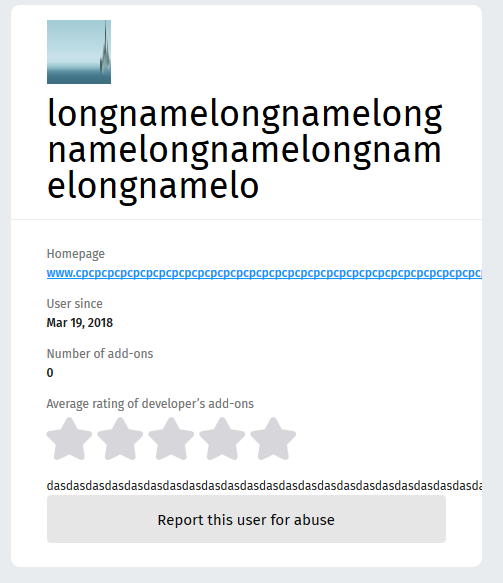
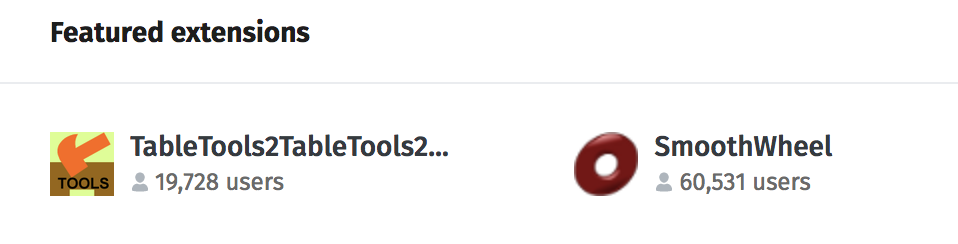
I was going through the list of bugs and I saw a few similar with unbroken strings, it means that when the string is too long, it's not nicely cropped with ellipsis at the end, but it continues to live trough the next containers and only ends on the edge of the browser(as the url on the picture):

longname 

I have not done anything to handle this situation before and I feel like it's something all programmers who touch front-end should know. So I decided to dig in. I have found an issue, solution and submitted another PR. 

So I learned how to break unbroken strings:
display: block;
overflow: hidden;
text-overflow: ellipsis;

I came across another similar bug and decided to contribute there as well.
So if you are Mozilla Firefox user and you are interested in Addons, the homepage will not be overwhelmed by overflowing strings:

screen shot 2018-04-20 at 11 22 06 pm

For now any of my pull requests are not merged and are pending to get reviewed probably on Monday.


Thursday, April 5, 2018

Release 0.5: Mozilla addons-frontend experience

Welcome to the project: Mozilla Style

When I was writing my previous blogpost about my experience with Mozilla, I didn't get a lot of interaction at that point, but on the next day my pull request was noticed and a lot of interesting things have happened to me.

First of all, my PR got merged!

Second thing: I was added to the recognition wiki! It's a small detail, but it made me feel special and valued!

Community manager(yes, that's a thing in Mozilla) invited me to become a Mozillian and vouched me!


My next steps: fixing more issues

Inspired by all the good things that had happened to me I started working on a new bug. I could not reproduce the bug, I was getting an error:

1]  Error: Error calling: /api/v3/accounts/profile/ (status: 500)
[1]     at createApiError (/.../addons-frontend/src/core/api/index.js:59:20)
[1]     at /.../addons-frontend/src/core/api/index.js:189:24
[1]     at <anonymous>
[1]     at process._tickDomainCallback (internal/process/next_tick.js:228:7)
[1] [2018-03-28T15:37:02.561Z] ERROR: server/86882 on mac...: Caught error during rendering: Error: Error calling: /api/v3/accounts/profile/ (status: 500) (app=amo)
[1] [2018-03-28T15:37:02.561Z] ERROR: server/86882 on mac...: Showing 500 page for error: Error: Error calling: /api/v3/accounts/profile/ (status:500) (app=amo)
[1] [2018-03-28T15:37:02.562Z] ERROR: server/86882 on mac...: Error calling: /api/v3/accounts/profile/ (status: 500) (app=amo)
[1]     Error: Error calling: /api/v3/accounts/profile/ (status: 500)
[1]         at createApiError (/.../addons-frontend/src/core/api/index.js:59:20)
[1]         at /.../addons-frontend/src/core/api/index.js:189:24
[1]         at <anonymous>
[1]         at process._tickDomainCallback (internal/process/next_tick.js:228:7)
[1] Warning: Failed prop type: The prop `component` is marked as required in `ServerHtml`, but its value is `undefined`.
[1]     in ServerHtml
[2] [2018-03-28T15:37:02.567Z]  INFO: proxy/86875 on mac...: 500 ~> http://127.0.0.1:3333/en-GB/firefox/addon/dew-on-spider-web/?src=featured (app=amo)


So I wrote a comment that I needed some help in the issue and moved on to another one. With some help of Chrome Developer Tools, I have located React Component and it's SCSS class that needed a change. I have submitted my PR request and only after that I have noticed a comment from Mozilla Member:

   Hi @svitlana-galianova, thanks for your interest but I'm going to be taking this issue. ðŸ˜„ 
   You can have a look at our "contrib: good first bugs" issues to find issues to contribute to.

I felt a bit out of place... Matt was super friendly about the situation and helped me to perfect my PR, so now it's fixed and merged!

And I had some more free time to come back an work on the issue, I started to work on, but was facing some blockers. I tried using another server instead of amo:stage, I started amo:dev and I was able to overcome my blocker and move on with the issue.

The problem in this issue was lack of space between the image and badge:
screen shot 2018-04-02 at 9 54 22 am

And of course that's a margin issue, so using Chrome Developer Tools again I was able to locate the place where this issue occurred. Matt reviewed my PR again, so after a bit of discussion: my fix was merged!

I have also started working on the third issue. To solve this issue I needed to find a way for this window to look good with text of different length:

English version:
screen shot 2018-04-02 at 1 08 24 pm
German version:
screen shot 2018-04-05 at 12 51 50 pm

After a bit of a research I have found width: fit-content property and fixed it, so my third PR is also merged now.

And as I thought that my Release 0.5 was complete, I had discovered that I have accidentally fixed another issue with one PR. I was going through the issues for my next release and I came across it, because it looked similar to what I just did. I expected to fix it real quick, but I didn't even have to do anything, since I had already fixed it.

I decided to take a look at issues for Release 0.6 and I found out that the issue I fixed for Release 0.4 got reopened, because the person who requested it needed another related small fix. I decided to fix it as well, so I submitted another PR and it landed without any changes requested by developers!

Good things happen after you make a right choice

I am so happy I switched to Mozilla Addons-frontend project!

That's the right place for me. I feel motivated to work with Open Source again. I don't feel the pressure of doing something not enjoyable anymore. And I feel good about myself! I am useful to the community and I am quite ok/good with what I do!

I think that's the place I hoped to be in the first place. It's nice to see the time you spend on something pays back and you get results. Nothing motivates me better than a success. And now I know another my programming strength: fixing React and SCSS issues.

Another good sign: the due date for this Release is in a few days and I am almost done! It has finally happened again: I have managed to become calm and happy again, I am not worried about homework. I enjoy working on Open Source and I get complimentary grades. That's awesome!


Sunday, March 25, 2018

How I turned my disaster into a huge relief

Why I was not happy* working on vscode

*Disclaimer: I have nothing against vscode, vscode community or Typescript, it was just not the right fit for me.


Did you ever feel the pressure of being forced to do something you didn't enjoy anymore?
But you had to stay, there was no escaping it, you had a goal.

That's exactly how I felt with vscode. It was exciting in the beginning, unfortunately there was one "but": it was not a perfect project for me. Typescript has never been my strength, in fact I didn't know it just 3 months ago, before I started working on vscode. 

I did not enjoy working on the project at all. It was my constant pain I had to tolerate. And here are reasons why: I wanted to learn Typescript, to contribute to something I use every day and to work on the back-end. If the first two reasons are self-explanatory, the third one need more input.


There was always an idea sitting at the back of my head that front-end was easy, back-end was more advanced. I was constantly told that at school, at work, most of my friends had the same opinion. And also all of the people I talked to about back-end vs front-end said that they hated css. When I started to work with React, I enjoyed it, it was easy and so straight forward. Even when I had some issues those were nothing compared to the back-end hell I had experienced. I tried to reject the thought that React was something I could do, I thought front-end was so easy for me because everyone can do it. It's back-end that requires more intelligence and I should head towards it.

That's exactly why I decided to go and contribute to vscode. It met all the requirements I had. Later, as I found out, it didn't meet the only big one it should: I was not happy and not obsessed about the project at all. Even finding a bug was a torture, I didn't understand half of the titles. But trying to fix those was even worse: going through tons of files, reading so much code, I still couldn't find the right spots where to start. It was so annoying, unconsciously I postponed and postponed my Releases to the last minute almost every time.


I felt jealous listening to my classmates presentations, not because working on open source was easy for them(it wasn't), but because they had passion and excitement. At least finding bugs seemed effortless and they always knew where they were going. I admired my classmates. Still I had more free time to invest into making vscode the same/similar experience. I was constantly telling myself: "It's just a beginning, it will get better, you need to get familiar with code at first". And three months later it only got worse.

At some point I decided to give up. It's not always a bad idea to come to a conclusion that it was not my place, I am not happy or helpful too much, so it was time to move on. A few of my classmates were working with React and in some places where they struggled, I saw a solution. This time I decided to contribute to something I enjoy, can contribute more and be helpful.

There was one project my classmate, Sean, is working on I spotted: addons-frontend Mozilla(AMO).
Which every his presentation I noticed how clearly I was reading the code he was showing, how I was understanding his every detail of a story. I decide to take a look at the issues and found a few interesting ones. So I decided to stick around.


How I fixed my first bug for AMO

I come to the conclusion that it's time to move on on Sunday. The day before Release 0.4 is due. I decided to abandon my bug in vscode and work on AMO. So I found this amazing "good first bug". To install the project I just need to run two commands: yarn && yarn amo:stage.

Nothing looked suspicious. I wish there was a note in the README:
"If you are a Windows user, you are doomed". 

Guess what? I am a Windows user! So I got npm error out of nowhere. I found a bug in AMO that described it.

The solution was to install Windows Subsystem for Linux... I can't describe how much pleasure** I get from installing stuff (**sarcasm). I don't even want to get into to much details here, my day was ruined, I spent 4-5 hours trying to figure it out. And even thought the process of installing Windows Subsystem was straight forward, I was getting weird errors every 5-10 minutes. It was a battle: me vs machines. I lost.

Another option was to configure a VM box: it took a while. And when it was almost done I realized that I could use my work laptop which happened to be MacBook. A few minutes later I had a built and compiled version of AMO running on my laptop.

About an hour later, after looking for a spot where a change for my issue should be implemented, I have submitted my PR. At least this story has a happy ending.

I have a hope that the hardest part is behind me, I will feel good while working with React and I will be useful to the community while learning this beautiful technology in a more advanced way.


P.S. Special thanks to my classmate Sean who decided to mentor me and help to change unit test to reflect my code changes.

P.S.S. This is a second time I have written this blog post. The first time when I have finished, I clicked "Save" button multiple times as I always did, I waited until "Saved" message had appeared and closed the tab. Switched laptops, opened my blog again and the blog post I spend about an hour and a half was gone. Today was definitely not my day.


Thursday, March 15, 2018

TIL: How to use DatePickerAndroid and TimePickerAndroid in React Native?

While working with React Native, I always tried to use built-in components instead of "reinventing" the bicycle.

So today the design mockups for my project required me to write the form for a user to pick up date and time. And I went to the React Native docs page and scrolled down the bar looking what they have to offer, which component I may use. That's how I came across DatePickerAndroid and TimePickerAndroid in API's section.

Even thought docs are quite straight forward, it took we a while to figure out how to properly use it.

Part 1. DatePickerAndroid


Let's start with DatePickerAndroid: first thing we need to do is to write "onPress" type of the function. Important step is to declare is as "async" function, otherwise you will get an annoying "await is a reserved word" error message.


Another important step that I forgot about was to import DatePickerAndroid from 'react-native' package.

In this case I have assigned data to directly to the state, if you would like to do the same DO NOT forget to add ".bind(this)", when you are calling your function: "random.datePicker.bind(this)".

You can use this function on any element that supports "onPress" property.

Another big challenge is styling DatePickerAndroid. Currently it cannot be done directly through React Native, but we can mess up a little bit with Android code:
"<project>\android\app\src\main\res\values\styles.xml" file in your React Native project.

Let's change the color scheme of the component!

If you want to use the dark theme simply change Theme.AppCompat.Light.NoActionBar to Theme.AppCompat and Theme.AppCompat.Light.Dialog to Theme.AppCompat.

Final result:

Part 2. TimePickerAndroid


TimePickerAndroid is similar to DatePickerAndroid, so once you figured out how to use one of them, you know how to use both:

As you can see even code and strategy how we are going to use it are the same, timePicker may be used as "onPress" function as well.

Even styling would be similar:

And if you want to have a darker theme you would have to perform all the same modifications as with DatePickerAndroid.

Final result:

Congratulations! Now you know how to make your form more user-friendly and do less validation!


Saturday, March 10, 2018

Release 0.3: Status Report

It's almost impossible to control how much work load you have.
These 2 weeks were super busy in my semester: midterms, assignments, labs, deadlines...

At some point working on my bug for Release 0.3 I realized that I don't have enough time to finish it for this Release. So it's work in progress; I was able to create a visible command on command pallet and now I need to work on functionality:


That will be done for Release 0.4. Meanwhile I was trying to fix this bug, I was working on localization for VS Code, here is what I accomplished:


In Transifex, your translation should be voted and reviewed by 2 people to be accepted, so that's not all the words I have localized, but only those that will appear on actual VS code Ukrainian and Russian instances.

I was also contacted by Andy Alt, who is working on a new project, to translate his project to Russian!

It felt nice to be remembered, I have already helped him with Russian and Ukrainian translations for rmw project in the last semester, so I was familiar with the process and agreed with no hesitations. So about 5-6 hours later I have submitted a PR to hldig project.

According to the README.md, "hl://Dig is a fork of ht://Dig, a world-wide-web search system for an intranet or small internet."

At first I thought that I won't do much for this release. But at the end of the day I translated about 300 lines worth of messages for Andy, 456 strings were approved and now are seen by Russian and Ukrainian VS Code users and I was able to create a "dummy" blah command in VS Code command pallet.


Tuesday, February 20, 2018

Release 0.2: How I fixed my issue

After the battle with my antivirus for a right to run locally compiled version of Visual Studio Code the most fun part started: fixing the issue.

It is always hard to start working in a new area of code or on something you have not done before. So it all starts with the research. My issue contained a few code pointers, but it was also about 1 year old, so those code pointers where only partly useful.

I took a look at the one of them, but that line didn't even exist at this point. God bless people who write comments! It was easy to identify that part of the code that was originally pointed out was this one:


It's an actual "Collapse All" functionality, I will be using in future. To find another code pointer I had to use good old git blame, but as I found out where it was pointing, I could not figure out why that piece of code was important (and I still can't, so maybe that is a reason why my pull request is Work In Progress and is not merged).

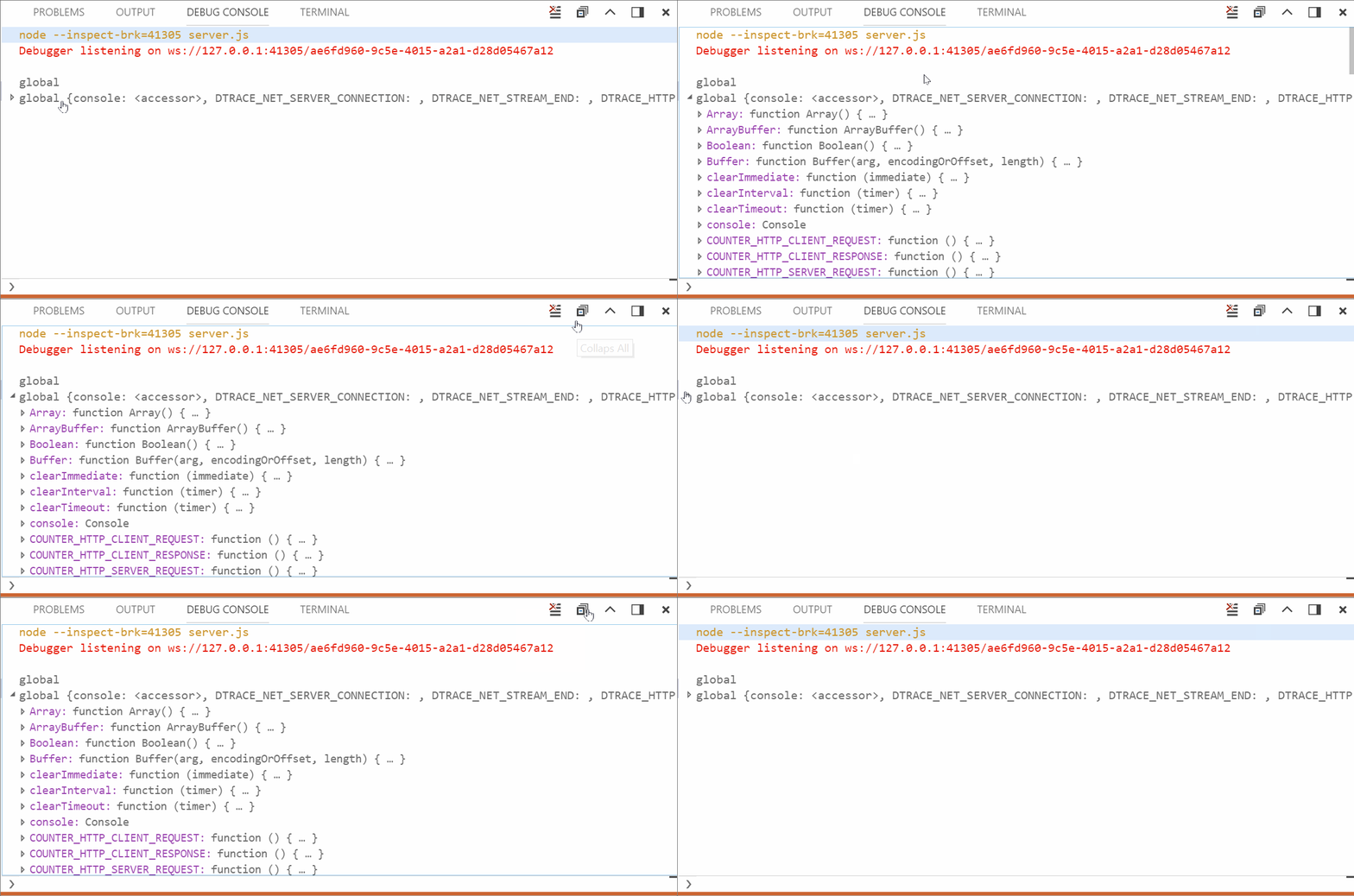
It is crazy how much code I got familiar with in "debug/debug console" while trying to find where the issue was supposed to get fixed. The first piece of code that popped-up was located here and looked like the place where the "neighbor" button "Clear All" was initialized:


Spoiler: wrong place... As I was trying to mimic "Clear All" button initialization, I got a better idea: why not to mimic the actual class, since those two are different. That's exactly what I did:


It was a good idea, as I found out later.

Still... Something was missing button did not magically appear on the screen. So I found another place where "Clear All" button was added to the Debug Console. I decided to try to add my button:


And after that I finally saw my "button", it was an empty placeholder without an icon! It felt like a real miracle. So it was just a matter of finding the right icon and CSS classes at this point.


And finally I got exactly what I wanted:


Even in both light and dark color schemes:


It took quite a long time to get exactly to the place of a change, but as soon as I found out where I need to make changes, fixing this issue become a pleasure.

UPDATE:
I have got a response in my pull request asking to remove button from the title area and add it to context menu. So after all I had to go with the original idea I had:


So here is a gif of what vscode community actually wanted:


Now it is just a matter of time for my PR to be merged!


Thursday, February 15, 2018

Release 0.2: Antivirus vs VS code

These 2 weeks I have been looking for and fixing this issue.

Recently my antivirus got updated... I am using Bitdefender and until this release I have never had problems with it. So one day when I had some time I decided to start working on my  issue. 

In my case the first step was reproducing the bug. So I tried to run vs code and I run into this error:

             [21:02:51] Using gulpfile C:\...\gulpfile.js
             [21:02:51] Starting 'clean-electron'...
             [21:02:51] Finished 'clean-electron' after 6.22 ms 
             [21:02:51] Starting 'electron'...
                ↓ electron-v1.7.9-win32-x64.zip [==============------] 68%events.js:183
                   throw er; // Unhandled 'error' event
                   ^

             Error: read ECONNRESET
                at _errnoException (util.js:1024:11)
                at TLSWrap.onread (net.js:615:25)
           [21:08:18] Syncronizing built-in extensions... 
           [21:08:18] You can manage built-in extensions with the --builtin flag
           [21:08:18] [marketplace] ms-vscode.node-debug@1.21.1 ✔︎
           [21:08:18] [marketplace] ms-vscode.node-debug2@1.21.0 ✔︎
     '".build\electron\Code - OSS.exe"' is not recognized as an internal or external command,
      operable program or batch file.


So after a few hours of research on StackOverflow, I wasn't getting anywhere. It was a lucky coincidence and I decided to check my antivirus. 

It always gives me million notifications about what is happening in the system, but not this time... My Bitdefender just silently blocked executables needed to run VS code.


It took me a while to disable blocking of all the files I needed to run, but I finally managed to restore all the files and finally run my instance of Visual Studio code.

Tip for future: if something goes wrong and you don't have an explanation, check your overprotective antivirus.


Sunday, February 11, 2018

TIL: React Native and Android. Tutorial Edition

This week I have been working on React Native Android application for one of my courses, so I decided to write a tutorial with everything you need to know to get started with React Native.

You can find the full code from this tutorial on GitHub.

I am not planning to go through setup, you can check this blog (it's only for Windows, here is one for Linux and for Mac).

So what happens next after running your app?

Your main page is App.js, so let's take a look what's going on there.

Everything that is under render() function's return is your view, so that's the part you will modify the most, this structure reminds me a little bit of HTML.

On the next few lines we can see styles,

I prefer to keep structure and styles separated in different files.
So let's do that!

To include your stylesheet in App.js you need to export module from your styles file and don't forget to import all the dependencies in your styles file:

In your App.js you have to import this file and use it as a "library":

One of the hardest parts (at least for me) is configuring navigation from page to page.
To add navigation to the project, you have to modify index.js file:


First of all you need to import StackNavigator and create constant property to pass navigation property to it, later on we will use that property to move user from component to component:

Now you need to configure StackNavigator component and make it main/first screen by passing reactNavigation property we have just created. And we need to register StackNavigator component, now when you need to redirect user to the next screen you will use "App" title and your application will know what you are talking about.


Now let's create a few buttons and extra component, so we can play around with our navigation and don't forget to import Button component:


It is highly important to add ".bind(this)" when you call your function, otherwise this.props and this.state won't be available in your function.

So here is my Next.js page:


Now you need to add Next component to index.js file, so it can be accessible by App component. Don't forget to import the page first:

And add the page to StackNavigator:

So let's our app and see how it works:


As you can see Navigation has added a bar at the top of the screen, it's not pretty, so here is a solution on how to can get rid of it. You need to add a few lines in index.js file in you StackNavigator component:


And here is how the app looks now:


I prefer to work with Emulator to work on styling and components, because it's easy to reload and see the changes almost instantly. But sometimes it's important to know how your app would feel on the actual phone.

Here is how you can easily run your android app on your phone.

First of all you need to configure development mode on your mobile device. This configuration may vary for each model, so I am not including it here.
Next step is to connect your phone to your computer using USB cable.
Now to run your application you should bundle it using the following command first (you have to rerun this one every time you make changes in your code):

$ react-native bundle --platform android --dev false --entry-file index.js
--bundle-output android/app/src/main/assets/index.android.bundle
--assets-dest android/app/src/main/res


Now you can run:

$ react-native run-android

And enjoy your awesome application on the phone!

You can find the full code from this tutorial on GitHub.


Tuesday, February 6, 2018

How to contribute to open source without coding skills?

The first thought that you have right now is probably: "It's not possible, she does not know what she is talking about". But give me a chance to prove my point.

If you know languages, you can contribute to open source projects. It doesn't matter if you know "human" or programming languages. Most of the big projects are in need of localization. And if you know more than one "human" language: it's your chance to shine! 

I am a localization contributor as well. I have recently started to translate for Visual Studio Code, so this is what you need to do to join the community:

Step 1: Get a transifex account (it's completely free).

Step 2: Request access to the project.

Step 3: Start contributing!

The website has user-friendly interface, but if you need detailed instruction on how to get started once you have joined an organization, here it is:

1) From your home page go to "Dashboard"


2) Select the project you want to work on

3) Click on "Translate"

4) If translating is available in a few languages you know, you will be asked to select one

5) You will also be asked to select a resource, it is just a subsection of a project


6) On the left you will see a few subcategories of strings


7) On the right side there is a panel where you can suggest translation or vote for one


I have noticed that community is in need of contributors. To have your translation be accepted you need to have 1 more vote from another contributor. I have translated a few strings and most of them were not reviewed due to lack of contributors.

And the whole translating process it quite pleasant. It feels like playing a game and may even be addictive. I noticed that when I get involved: it's hard to stop.

Even if you don't want to translate strings you may start as a reviewer, just get involved with terminology and you will be a great fit to translators' community! And don't worry, you will be recognized and even included in release notes under "thank you" header!


Just imagine how many people will see our name and will benefit from 20-30 minutes of your time!


Some helpful links:


Saturday, January 27, 2018

New semester. New projects. More open source

So I have got thought Open Source Development I course in Seneca College successfully.
Now I am one of not many brave people who are taking Open Source Development II. 

This course is a bit more different in terms of work load. In previous semester I have completed 2 releases (in other words: my professor marked 2 sets of issues I have attempted to fix on GitHub). And this semester I have bi-weekly releases, which means 7 releases. 
I am not excited to be overwhelmed during my last semester in school and I am not a fan of spoiling my transcript, so I need a plan.

First of all, as our professor has advised, the best way is to stick to one project. Originally I wanted to work in Golang on Golang☺. 

But after several attempts to sell it to my classmates, I was sold on contributing to VS Code. This open source editor is quite popular these days. I even wrote an article about using it and some other IDEs a while ago. A lot of people with whom I work/study are using it daily. This is a perfect opportunity to become involved in a large project that affects me and people I know directly.

So I decided to contribute as both developer and translator. I remember the struggle I had with English version of Visual Studio, when I was about 12-13 years old and was confused not only but English, but also by programming in general. So I hope other kids/people in Ukraine and Russia will have more comfort and I want to help! So while I was installing dependencies for vscode project, I found an instruction on how I can contribute to translations.

I even had a chance to translate and rate a few dozens of lines and strings while waiting for all the dependencies to load.
Setting up vs code at my personal computer was a piece of cake, I followed instructions in the vscode Github repository and everything just worked!

My professor suggested not to stress ourselves out and pick some small "good-first-bug" just to get involved. So that was exactly what I did. I picked this "please remove" bug. It was quite an easy fix: Ctrl+F, Delete. I have submitted pull request and to my surprise one of the tests was failing!


3827 passing (30s)
1 failing
1) FileService "before each" hook for "moveFile - MIX CASE":
Error: timeout of 2000ms exceeded. Ensure the done() callback is being called in this test.
The command "if [[ "$TRAVIS_OS_NAME" == "linux" ]]; then ./scripts/test.sh --coverage --reporter dot; else ./scripts/test.sh --reporter dot; fi" exited with 1.

I was confused... That error was not even related to my fix, so I asked for help.

It was on Saturday, so I didn't expect to get the response until Monday. And the first thing I saw in the morning on Monday was an email from GitHub. My PR got merged and it will be shipped with Visual Studio Code for their January 2018 release! I was happy about how not painful this time my experience was. And that was the test that had some issues.


So my first release is done in this semester!


Monday, January 1, 2018

My Christmas / New Year Journey: Fixing bugs. Part 2

Happy New 2018 Year!

First part of the blog is available here.

So I have been looking for some new bug for the last few days. I have found a few interesting once, contacted different project maintainers, but they didn't respond. Probably because of the holidays.

And finally I found something interesting: rmw project.
As it states on GitHub page: "rmw is an OS portable cli trash can utility written in C. It can send files to your "Desktop" trash, or a completely separate folder. It can also: restore files; permanently delete files that were rmw'ed more than xx number of days ago; skip files or directories that have a "PROTECT" directive in the configuration file; and append a unique string to the filenames so they won't be overwritten (duplication protection)."

I was always curious how the different projects are available in multiple languages, I thought it required a lot of copy-pasted text and if statements... But during my experience I found out that one of the ways is to use gettext tool. So I decided to contribute and translate the output messages to Russian and Ukrainian.

It was definitely an interesting experience and welcoming community!

I can now tell that I finally feel comfortable with contributing, creating pull requests and starting to work on the new projects!

During last 4 months I tried to gain confidence as an open source contributor and programmer.

My goal was to learn more "how big programmers code", best practices and explore some technologies, I have never heard/tried before.

I can say with confidence that I have done at all of that.

And since it's impossible to know and try everything in IT field, I will still continue my journey in Open Source, in exploring new technologies and programming languages by myself.

Saturday, December 30, 2017

My Christmas Journey: Fixing bugs. Part 1

Merry Christmas and Happy New Year!

A bit later after my holidays, I remembered that I need to finish my assignment for Open Source Development. I have planned how I was going to work on it in this blog post. I planed to work on it for 1 month instead of 9 days, but due to personal reasons, I couldn't do that. So here I am: 7 days before the deadline(It's not 7 hours, so I think it's quite doable).

As I expected the bug I planned to work on about a month ago has been already silently fixed, so I didn't even get any email notifications about activity on the issue I have been following on the GitHub. That happened a few days ago and of course I got stressed out. So I have asked my friend, Ray Gervais (link to his blog), to recommend me some interesting developing project and he did.

He was contributing to a CSS Framework based on Flexbox called Bulma. Even though originally I was planning to concentrate more on Node.js, JavaScript and React, I thought it might been a good idea to see how CSS Frameworks work from the inside.

So I picked up a new bug. This experience started with "Oh my God, this is amazing!" comment. When you start contributing to a new project you need to set up an environment, download all the technologies you may not have on your computer... Well, apart from forking the repository and cloning it locally, I spent 5 minutes on setup: npm install and npm start (to run the project). It would be a bit longer if you don't have node.js on your machine, but it is still faster than a lot of other large projects.

I have started looking into the code. And at some point I asked myself "what am I trying to do here?". Originally I thought the requester meant to add an ability to write buttons with different sizes, that was already implemented(I wish I read the docs, I just found a piece of code), so I contacted my friend again just to confirm that I am not going crazy and it already exists.

Spoiler: later that day the requester made his idea clearer, but I think that should be reviewed by somebody who maintenance the project first.

Still it was a nice experience getting familiar with a new code, but I didn't find my bug yet...
Next part of the blog is available here.


Tuesday, December 12, 2017

Goals for the next month

It's about month before the due date for the next project for my Open Source course.
So it's time to set some goals and determine how I am going to grow as an open source contributor.

My goals are:

It's quite tricky to work on the assignment at the end of the semester with no plan. And Christmas is coming! I definitely need a plan how to spend more time with my family and friends, but also do my best for this project.

My plan:
  • Spend 3 hours on fixing bugs every week from Dec 12 till Jan 5
  • Learn Node.js, JavaScript and React if needed (depends on my knowledge and bugs I find)
  • Fix at least 2 bugs
So far I have found only one bug, but I hope to get involved in this project and continue working on it.


It's only a beginning

What have I learned for the past 8 months of Open Source Programming? I was convinced from the very beginning that this course would be i...