Sunday, April 22, 2018

Release 0.6: More contributions

So it's been another two weeks already.
I am still on the "honeymoon" phase with Mozilla Addons-frontend project. There are always bugs for me to fix. 

My strategy didn't change that much from the previous release:

1) find a bug
2) reproduce a bug
3) find a quickest fix modifying state of the properties right in Google Developer tools
4) try to make the fix more specific for the needed area of code
5) improve my fix, remove redundant code
6) submit PR

The first bug, I have fixed. was caused by my previous PR, so I felt like it was my responsibility to fix it. It was about putting the right icon for the right error message. Originally the green message had an exclamation mark as an icon, but I have changed it to be Mozilla Firefox icon. My fix affected a red message as well, so I have wrote a different SCSS class to handle green message.
screen shot 2018-04-19 at 12 43 59 pmscreen shot 2018-04-19 at 12 45 14 pm
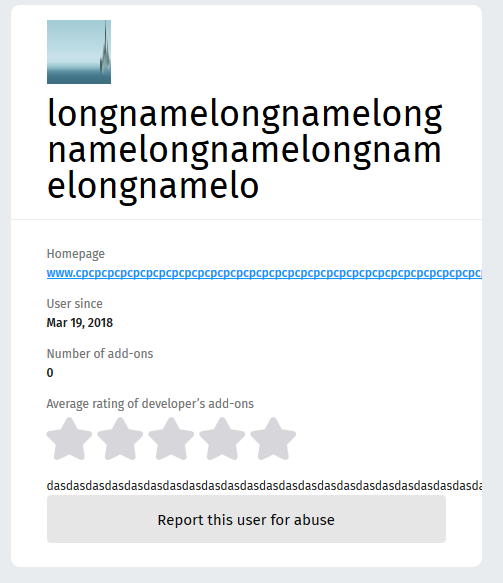
I was going through the list of bugs and I saw a few similar with unbroken strings, it means that when the string is too long, it's not nicely cropped with ellipsis at the end, but it continues to live trough the next containers and only ends on the edge of the browser(as the url on the picture):

longname 

I have not done anything to handle this situation before and I feel like it's something all programmers who touch front-end should know. So I decided to dig in. I have found an issue, solution and submitted another PR. 

So I learned how to break unbroken strings:
display: block;
overflow: hidden;
text-overflow: ellipsis;

I came across another similar bug and decided to contribute there as well.
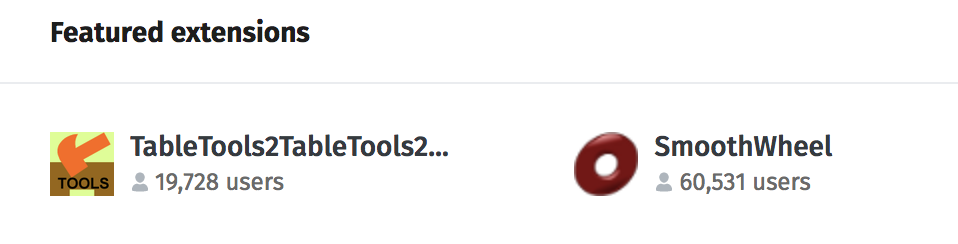
So if you are Mozilla Firefox user and you are interested in Addons, the homepage will not be overwhelmed by overflowing strings:

screen shot 2018-04-20 at 11 22 06 pm

For now any of my pull requests are not merged and are pending to get reviewed probably on Monday.


Thursday, April 5, 2018

Release 0.5: Mozilla addons-frontend experience

Welcome to the project: Mozilla Style

When I was writing my previous blogpost about my experience with Mozilla, I didn't get a lot of interaction at that point, but on the next day my pull request was noticed and a lot of interesting things have happened to me.

First of all, my PR got merged!

Second thing: I was added to the recognition wiki! It's a small detail, but it made me feel special and valued!

Community manager(yes, that's a thing in Mozilla) invited me to become a Mozillian and vouched me!


My next steps: fixing more issues

Inspired by all the good things that had happened to me I started working on a new bug. I could not reproduce the bug, I was getting an error:

1]  Error: Error calling: /api/v3/accounts/profile/ (status: 500)
[1]     at createApiError (/.../addons-frontend/src/core/api/index.js:59:20)
[1]     at /.../addons-frontend/src/core/api/index.js:189:24
[1]     at <anonymous>
[1]     at process._tickDomainCallback (internal/process/next_tick.js:228:7)
[1] [2018-03-28T15:37:02.561Z] ERROR: server/86882 on mac...: Caught error during rendering: Error: Error calling: /api/v3/accounts/profile/ (status: 500) (app=amo)
[1] [2018-03-28T15:37:02.561Z] ERROR: server/86882 on mac...: Showing 500 page for error: Error: Error calling: /api/v3/accounts/profile/ (status:500) (app=amo)
[1] [2018-03-28T15:37:02.562Z] ERROR: server/86882 on mac...: Error calling: /api/v3/accounts/profile/ (status: 500) (app=amo)
[1]     Error: Error calling: /api/v3/accounts/profile/ (status: 500)
[1]         at createApiError (/.../addons-frontend/src/core/api/index.js:59:20)
[1]         at /.../addons-frontend/src/core/api/index.js:189:24
[1]         at <anonymous>
[1]         at process._tickDomainCallback (internal/process/next_tick.js:228:7)
[1] Warning: Failed prop type: The prop `component` is marked as required in `ServerHtml`, but its value is `undefined`.
[1]     in ServerHtml
[2] [2018-03-28T15:37:02.567Z]  INFO: proxy/86875 on mac...: 500 ~> http://127.0.0.1:3333/en-GB/firefox/addon/dew-on-spider-web/?src=featured (app=amo)


So I wrote a comment that I needed some help in the issue and moved on to another one. With some help of Chrome Developer Tools, I have located React Component and it's SCSS class that needed a change. I have submitted my PR request and only after that I have noticed a comment from Mozilla Member:

   Hi @svitlana-galianova, thanks for your interest but I'm going to be taking this issue. ðŸ˜„ 
   You can have a look at our "contrib: good first bugs" issues to find issues to contribute to.

I felt a bit out of place... Matt was super friendly about the situation and helped me to perfect my PR, so now it's fixed and merged!

And I had some more free time to come back an work on the issue, I started to work on, but was facing some blockers. I tried using another server instead of amo:stage, I started amo:dev and I was able to overcome my blocker and move on with the issue.

The problem in this issue was lack of space between the image and badge:
screen shot 2018-04-02 at 9 54 22 am

And of course that's a margin issue, so using Chrome Developer Tools again I was able to locate the place where this issue occurred. Matt reviewed my PR again, so after a bit of discussion: my fix was merged!

I have also started working on the third issue. To solve this issue I needed to find a way for this window to look good with text of different length:

English version:
screen shot 2018-04-02 at 1 08 24 pm
German version:
screen shot 2018-04-05 at 12 51 50 pm

After a bit of a research I have found width: fit-content property and fixed it, so my third PR is also merged now.

And as I thought that my Release 0.5 was complete, I had discovered that I have accidentally fixed another issue with one PR. I was going through the issues for my next release and I came across it, because it looked similar to what I just did. I expected to fix it real quick, but I didn't even have to do anything, since I had already fixed it.

I decided to take a look at issues for Release 0.6 and I found out that the issue I fixed for Release 0.4 got reopened, because the person who requested it needed another related small fix. I decided to fix it as well, so I submitted another PR and it landed without any changes requested by developers!

Good things happen after you make a right choice

I am so happy I switched to Mozilla Addons-frontend project!

That's the right place for me. I feel motivated to work with Open Source again. I don't feel the pressure of doing something not enjoyable anymore. And I feel good about myself! I am useful to the community and I am quite ok/good with what I do!

I think that's the place I hoped to be in the first place. It's nice to see the time you spend on something pays back and you get results. Nothing motivates me better than a success. And now I know another my programming strength: fixing React and SCSS issues.

Another good sign: the due date for this Release is in a few days and I am almost done! It has finally happened again: I have managed to become calm and happy again, I am not worried about homework. I enjoy working on Open Source and I get complimentary grades. That's awesome!



Sunday, March 25, 2018

How I turned my disaster into a huge relief

Why I was not happy* working on vscode

*Disclaimer: I have nothing against vscode, vscode community or Typescript, it was just not the right fit for me.


Did you ever feel the pressure of being forced to do something you didn't enjoy anymore?
But you had to stay, there was no escaping it, you had a goal.

That's exactly how I felt with vscode. It was exciting in the beginning, unfortunately there was one "but": it was not a perfect project for me. Typescript has never been my strength, in fact I didn't know it just 3 months ago, before I started working on vscode. 

I did not enjoy working on the project at all. It was my constant pain I had to tolerate. And here are reasons why: I wanted to learn Typescript, to contribute to something I use every day and to work on the back-end. If the first two reasons are self-explanatory, the third one need more input.


There was always an idea sitting at the back of my head that front-end was easy, back-end was more advanced. I was constantly told that at school, at work, most of my friends had the same opinion. And also all of the people I talked to about back-end vs front-end said that they hated css. When I started to work with React, I enjoyed it, it was easy and so straight forward. Even when I had some issues those were nothing compared to the back-end hell I had experienced. I tried to reject the thought that React was something I could do, I thought front-end was so easy for me because everyone can do it. It's back-end that requires more intelligence and I should head towards it.

That's exactly why I decided to go and contribute to vscode. It met all the requirements I had. Later, as I found out, it didn't meet the only big one it should: I was not happy and not obsessed about the project at all. Even finding a bug was a torture, I didn't understand half of the titles. But trying to fix those was even worse: going through tons of files, reading so much code, I still couldn't find the right spots where to start. It was so annoying, unconsciously I postponed and postponed my Releases to the last minute almost every time.


I felt jealous listening to my classmates presentations, not because working on open source was easy for them(it wasn't), but because they had passion and excitement. At least finding bugs seemed effortless and they always knew where they were going. I admired my classmates. Still I had more free time to invest into making vscode the same/similar experience. I was constantly telling myself: "It's just a beginning, it will get better, you need to get familiar with code at first". And three months later it only got worse.

At some point I decided to give up. It's not always a bad idea to come to a conclusion that it was not my place, I am not happy or helpful too much, so it was time to move on. A few of my classmates were working with React and in some places where they struggled, I saw a solution. This time I decided to contribute to something I enjoy, can contribute more and be helpful.

There was one project my classmate, Sean, is working on I spotted: addons-frontend Mozilla(AMO).
Which every his presentation I noticed how clearly I was reading the code he was showing, how I was understanding his every detail of a story. I decide to take a look at the issues and found a few interesting ones. So I decided to stick around.


How I fixed my first bug for AMO

I come to the conclusion that it's time to move on on Sunday. The day before Release 0.4 is due. I decided to abandon my bug in vscode and work on AMO. So I found this amazing "good first bug". To install the project I just need to run two commands: yarn && yarn amo:stage.

Nothing looked suspicious. I wish there was a note in the README:
"If you are a Windows user, you are doomed". 

Guess what? I am a Windows user! So I got npm error out of nowhere. I found a bug in AMO that described it.

The solution was to install Windows Subsystem for Linux... I can't describe how much pleasure** I get from installing stuff (**sarcasm). I don't even want to get into to much details here, my day was ruined, I spent 4-5 hours trying to figure it out. And even thought the process of installing Windows Subsystem was straight forward, I was getting weird errors every 5-10 minutes. It was a battle: me vs machines. I lost.

Another option was to configure a VM box: it took a while. And when it was almost done I realized that I could use my work laptop which happened to be MacBook. A few minutes later I had a built and compiled version of AMO running on my laptop.

About an hour later, after looking for a spot where a change for my issue should be implemented, I have submitted my PR. At least this story has a happy ending.

I have a hope that the hardest part is behind me, I will feel good while working with React and I will be useful to the community while learning this beautiful technology in a more advanced way.


P.S. Special thanks to my classmate Sean who decided to mentor me and help to change unit test to reflect my code changes.

P.S.S. This is a second time I have written this blog post. The first time when I have finished, I clicked "Save" button multiple times as I always did, I waited until "Saved" message had appeared and closed the tab. Switched laptops, opened my blog again and the blog post I spend about an hour and a half was gone. Today was definitely not my day.


Thursday, March 15, 2018

TIL: How to use DatePickerAndroid and TimePickerAndroid in React Native?

While working with React Native, I always tried to use built-in components instead of "reinventing" the bicycle.

So today the design mockups for my project required me to write the form for a user to pick up date and time. And I went to the React Native docs page and scrolled down the bar looking what they have to offer, which component I may use. That's how I came across DatePickerAndroid and TimePickerAndroid in API's section.

Even thought docs are quite straight forward, it took we a while to figure out how to properly use it.

Part 1. DatePickerAndroid


Let's start with DatePickerAndroid: first thing we need to do is to write "onPress" type of the function. Important step is to declare is as "async" function, otherwise you will get an annoying "await is a reserved word" error message.


Another important step that I forgot about was to import DatePickerAndroid from 'react-native' package.

In this case I have assigned data to directly to the state, if you would like to do the same DO NOT forget to add ".bind(this)", when you are calling your function: "random.datePicker.bind(this)".

You can use this function on any element that supports "onPress" property.

Another big challenge is styling DatePickerAndroid. Currently it cannot be done directly through React Native, but we can mess up a little bit with Android code:
"<project>\android\app\src\main\res\values\styles.xml" file in your React Native project.

Let's change the color scheme of the component!

If you want to use the dark theme simply change Theme.AppCompat.Light.NoActionBar to Theme.AppCompat and Theme.AppCompat.Light.Dialog to Theme.AppCompat.

Final result:

Part 2. TimePickerAndroid


TimePickerAndroid is similar to DatePickerAndroid, so once you figured out how to use one of them, you know how to use both:

As you can see even code and strategy how we are going to use it are the same, timePicker may be used as "onPress" function as well.

Even styling would be similar:

And if you want to have a darker theme you would have to perform all the same modifications as with DatePickerAndroid.

Final result:

Congratulations! Now you know how to make your form more user-friendly and do less validation!


Saturday, March 10, 2018

Release 0.3: Status Report

It's almost impossible to control how much work load you have.
These 2 weeks were super busy in my semester: midterms, assignments, labs, deadlines...

At some point working on my bug for Release 0.3 I realized that I don't have enough time to finish it for this Release. So it's work in progress; I was able to create a visible command on command pallet and now I need to work on functionality:


That will be done for Release 0.4. Meanwhile I was trying to fix this bug, I was working on localization for VS Code, here is what I accomplished:


In Transifex, your translation should be voted and reviewed by 2 people to be accepted, so that's not all the words I have localized, but only those that will appear on actual VS code Ukrainian and Russian instances.

I was also contacted by Andy Alt, who is working on a new project, to translate his project to Russian!

It felt nice to be remembered, I have already helped him with Russian and Ukrainian translations for rmw project in the last semester, so I was familiar with the process and agreed with no hesitations. So about 5-6 hours later I have submitted a PR to hldig project.

According to the README.md, "hl://Dig is a fork of ht://Dig, a world-wide-web search system for an intranet or small internet."

At first I thought that I won't do much for this release. But at the end of the day I translated about 300 lines worth of messages for Andy, 456 strings were approved and now are seen by Russian and Ukrainian VS Code users and I was able to create a "dummy" blah command in VS Code command pallet.


Tuesday, February 20, 2018

Release 0.2: How I fixed my issue

After the battle with my antivirus for a right to run locally compiled version of Visual Studio Code the most fun part started: fixing the issue.

It is always hard to start working in a new area of code or on something you have not done before. So it all starts with the research. My issue contained a few code pointers, but it was also about 1 year old, so those code pointers where only partly useful.

I took a look at the one of them, but that line didn't even exist at this point. God bless people who write comments! It was easy to identify that part of the code that was originally pointed out was this one:


It's an actual "Collapse All" functionality, I will be using in future. To find another code pointer I had to use good old git blame, but as I found out where it was pointing, I could not figure out why that piece of code was important (and I still can't, so maybe that is a reason why my pull request is Work In Progress and is not merged).

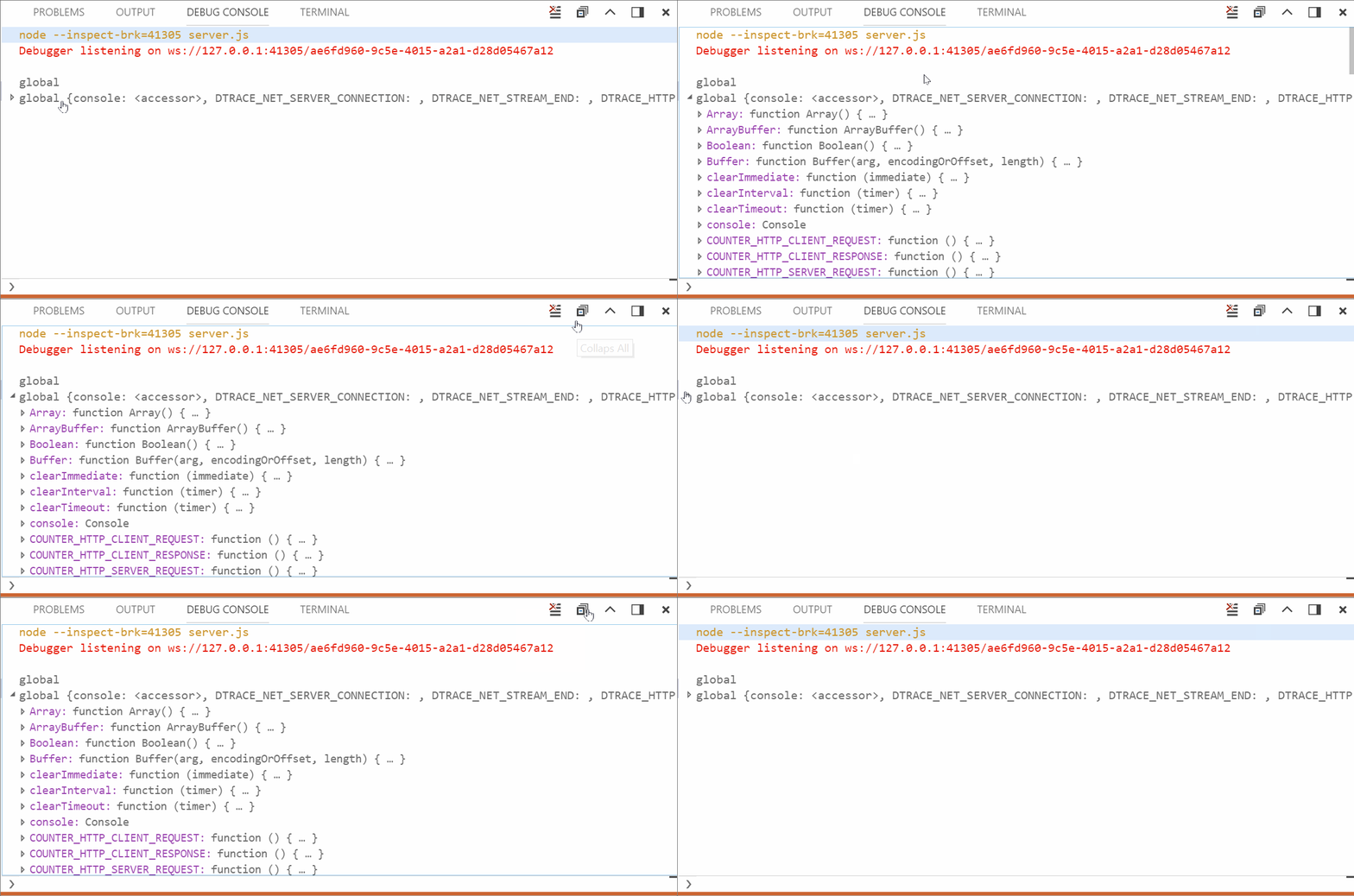
It is crazy how much code I got familiar with in "debug/debug console" while trying to find where the issue was supposed to get fixed. The first piece of code that popped-up was located here and looked like the place where the "neighbor" button "Clear All" was initialized:


Spoiler: wrong place... As I was trying to mimic "Clear All" button initialization, I got a better idea: why not to mimic the actual class, since those two are different. That's exactly what I did:


It was a good idea, as I found out later.

Still... Something was missing button did not magically appear on the screen. So I found another place where "Clear All" button was added to the Debug Console. I decided to try to add my button:


And after that I finally saw my "button", it was an empty placeholder without an icon! It felt like a real miracle. So it was just a matter of finding the right icon and CSS classes at this point.


And finally I got exactly what I wanted:


Even in both light and dark color schemes:


It took quite a long time to get exactly to the place of a change, but as soon as I found out where I need to make changes, fixing this issue become a pleasure.

UPDATE:
I have got a response in my pull request asking to remove button from the title area and add it to context menu. So after all I had to go with the original idea I had:


So here is a gif of what vscode community actually wanted:


Now it is just a matter of time for my PR to be merged!


Thursday, February 15, 2018

Release 0.2: Antivirus vs VS code

These 2 weeks I have been looking for and fixing this issue.

Recently my antivirus got updated... I am using Bitdefender and until this release I have never had problems with it. So one day when I had some time I decided to start working on my  issue. 

In my case the first step was reproducing the bug. So I tried to run vs code and I run into this error:

             [21:02:51] Using gulpfile C:\...\gulpfile.js
             [21:02:51] Starting 'clean-electron'...
             [21:02:51] Finished 'clean-electron' after 6.22 ms 
             [21:02:51] Starting 'electron'...
                ↓ electron-v1.7.9-win32-x64.zip [==============------] 68%events.js:183
                   throw er; // Unhandled 'error' event
                   ^

             Error: read ECONNRESET
                at _errnoException (util.js:1024:11)
                at TLSWrap.onread (net.js:615:25)
           [21:08:18] Syncronizing built-in extensions... 
           [21:08:18] You can manage built-in extensions with the --builtin flag
           [21:08:18] [marketplace] ms-vscode.node-debug@1.21.1 ✔︎
           [21:08:18] [marketplace] ms-vscode.node-debug2@1.21.0 ✔︎
     '".build\electron\Code - OSS.exe"' is not recognized as an internal or external command,
      operable program or batch file.


So after a few hours of research on StackOverflow, I wasn't getting anywhere. It was a lucky coincidence and I decided to check my antivirus. 

It always gives me million notifications about what is happening in the system, but not this time... My Bitdefender just silently blocked executables needed to run VS code.


It took me a while to disable blocking of all the files I needed to run, but I finally managed to restore all the files and finally run my instance of Visual Studio code.

Tip for future: if something goes wrong and you don't have an explanation, check your overprotective antivirus.


It's only a beginning

What have I learned for the past 8 months of Open Source Programming? I was convinced from the very beginning that this course would be i...